

If you are connecting a CRM to an email platform, or fixing a connection you already have, you know the connector is the easy part. Deciding who can write what takes longer, and it determines whether the integration works. Left alone, your CRM and your email tool behave like two coworkers who never talk.
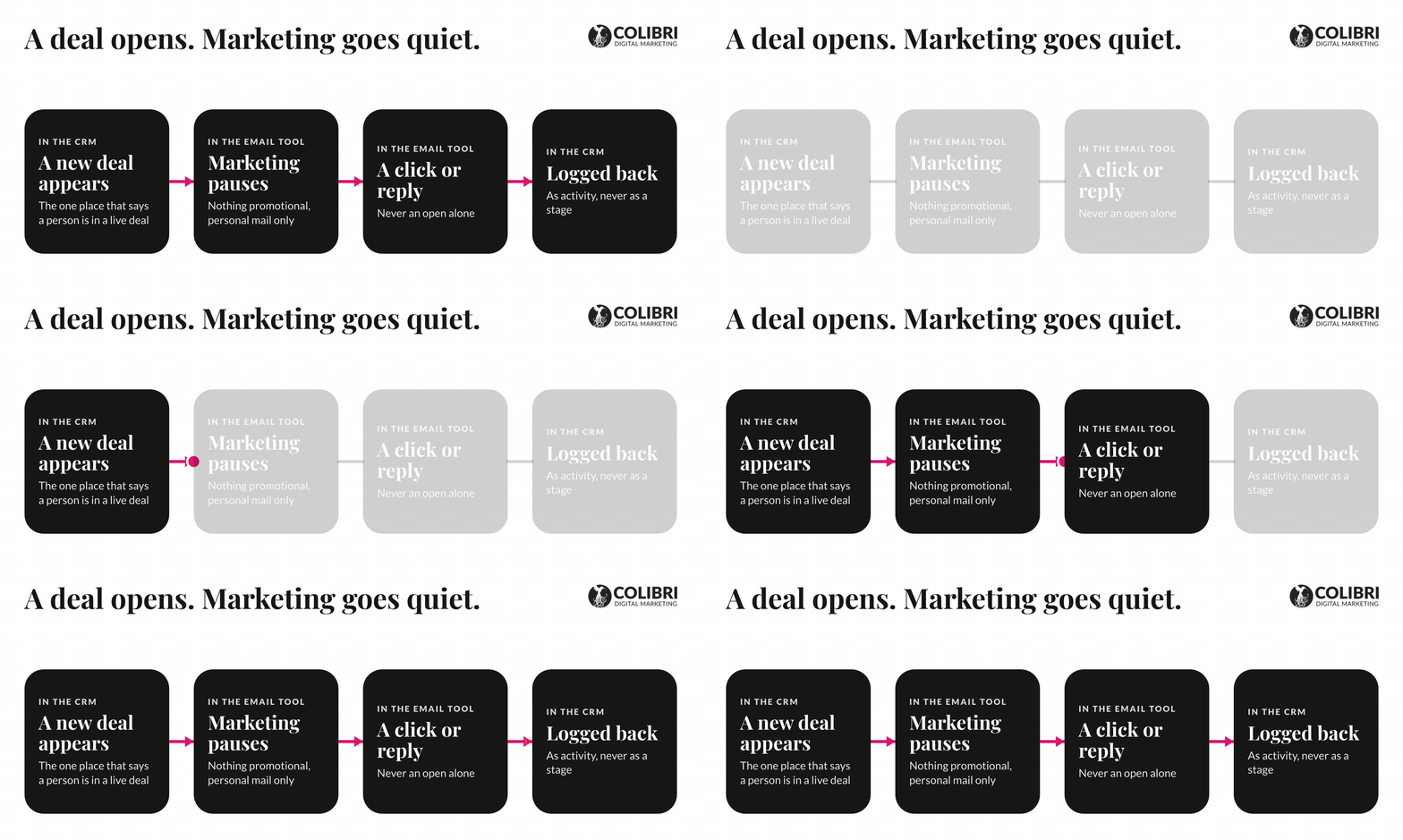
Let’s think it through. A prospect is in a live sales conversation with you. Your email tool never heard about the deal, so on Tuesday the prospect gets the cold nurture sequence (the one that asks whether they have thought about marketing).
Nobody can say which month worked or what to do next, because the facts sit in two places that disagree.
The solution is to pick the system of record for each kind of data, give every field one owner, let real events trigger email (a click, a reply, a form, a booking, or a deal stage), and connect last. The connector is the last choice, not the first.
What Is CRM and Email Integration?
Your CRM holds the record of who your contacts are and where each one stands with you, and your email platform sends the messages. CRM and email integration is the connection that lets the first decide who qualifies for which message while the second sends it, honors consent, and reports back what people did. That is why the CRM is called the system of record: it is the one place allowed to say "this person is in a live deal," and everything else acts on what it says.
Your pipeline is relationships, so the email has to know where each one stands. Someone who booked a call this morning and someone who downloaded a guide last year should not get the same message.
Zoom out and the picture is no tidier: organizations run an average of 897 applications, and only 29% are integrated (1). That is an enterprise survey, but a smaller stack fails the same way.
Before you connect anything, ask whether you need two systems at all.
For a firm with about ten people, one platform for CRM and email removes the connection between two tools, where most of the failures we see start. The price is a thinner CRM.
Why Do Connected Tools Still Send the Wrong Email?
Because a connector is the most literal employee you will ever have: it does exactly what it was told, including the wrong thing. Four causes cover most of it. Two systems are both allowed to write the same field, a trigger watches a field that changes for unrelated reasons, and nothing pauses marketing once a deal is open.
Lifecycle stage is the classic case. When both tools can set it, each one overwrites the other's idea of where a contact stands, and the stage stops meaning anything. When we audit a stack, the first thing we check is who owns the lifecycle field. If the answer is "both," we’ve found the culprit.
The fourth cause is the easiest to fix. Apple's Mail Privacy Protection pre-loads messages, so an "open" can mean a phone fetched the email while its owner slept (no human involved). Apple accounts for about three in four tracked email opens, and Litmus itself treats the privacy-protected ones as unreliable (2). So an open should never move a contact's stage. Trigger on a click, a reply, a form, a booking, or a deal stage.
What Does the Integration Map Look Like?
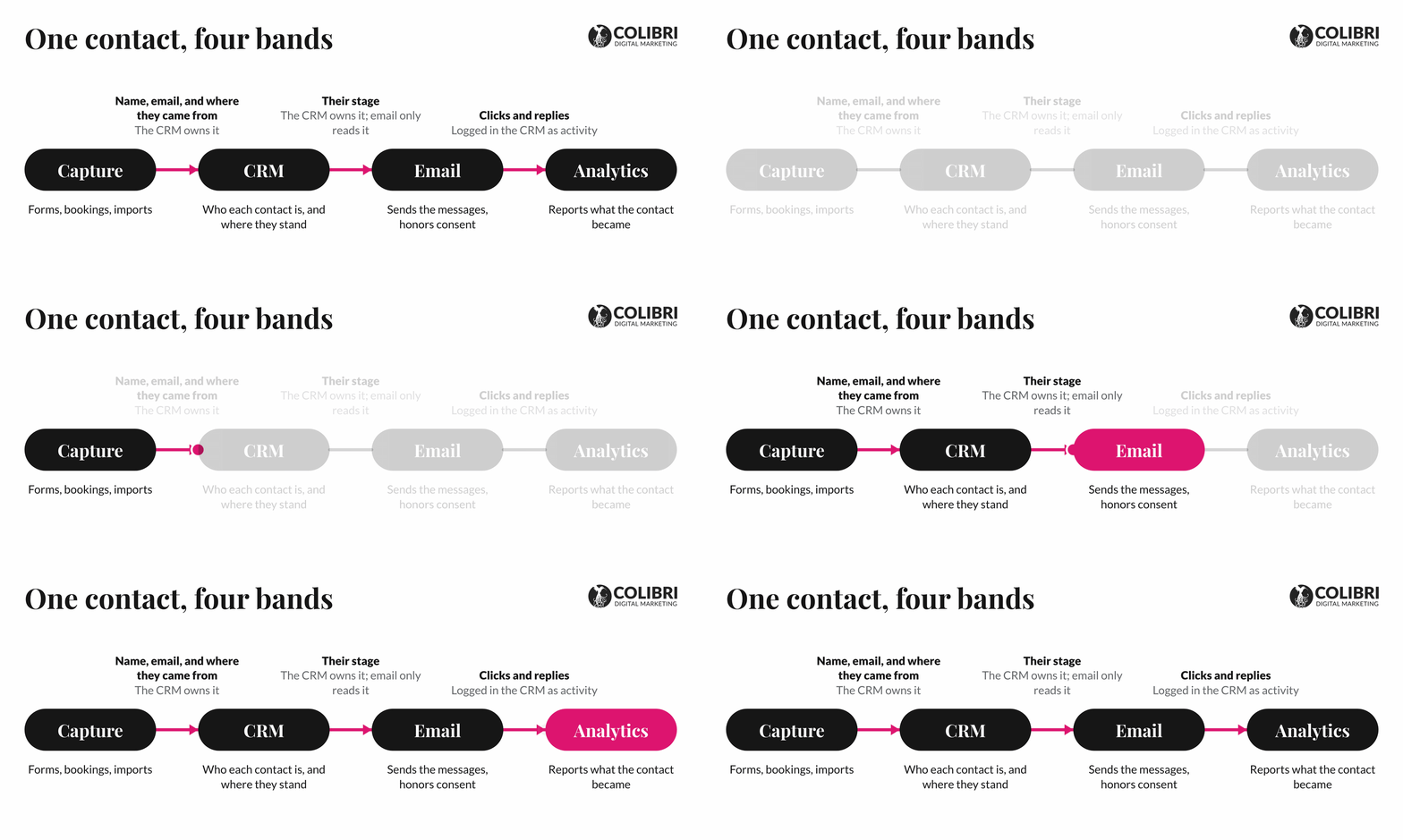
Picture four bands with one contact running through them. Capture comes first (forms, bookings, imports), then the CRM, then the email platform, then analytics, which reports what the contact became.
Every handoff between bands is a place where something can break, so label each one in plain words: what moves, in which direction, and who owns it. It is the first slice of a marketing system architecture.
One-Way or Two-Way Sync? Who Owns Each Field?
Neither, by default. Think of a shared spreadsheet where two people each believe column C is theirs. Decide per field: one writer, one direction, and a declared winner if both sides ever disagree.
You also need a way for both tools to recognize the same person. Use the email address until the CRM ID exists, then use both, and make sure a changed address updates the old record instead of creating a new one. A duplicate is a contact's evil twin, and the quietest break in a stack.
Make a copy of the template and fill in the Who owns it column before you touch a connector.
| What | Who owns it | The rule |
| Name and email address | CRM | The email tool never overwrites them, and a changed address updates the existing record |
| Lifecycle stage | CRM | The email tool reads it and never sets it |
| Deal stage | CRM | Both a trigger and a stop rule: marketing pauses while a deal is open |
| Where the contact came from | CRM | Locked at creation; later forms and imports never overwrite it |
| Consent and unsubscribes | Email platform | The CRM mirrors it at once, and an unsubscribe never clears on its own |
| Clicks and replies | Email platform | Logged in the CRM as activity, never stored as a stage; opens excluded |
| Revenue and deal value | CRM or billing | The email tool never holds it |
Each kind of record (contact, company, deal) has one system of record. Consent lives where the contact can change it, so the email platform owns it, and the CRM mirrors it. And the one we repeat most: a field with no owner gets no writer, human or machine.
That last rule matters more now that AI agents can edit CRM records. An agent is a third writer on your data, and it never tires. We recommend declaring the owner before you grant the writer, then letting the agent earn access one step at a time: read, draft, approve, and only then automatic.
Which Stages Should Trigger Which Emails?
A contact's stage comes from what they did, never from how long they have been on your list. We recommend the lifecycle below, built on the rulebook we use for our own contacts.
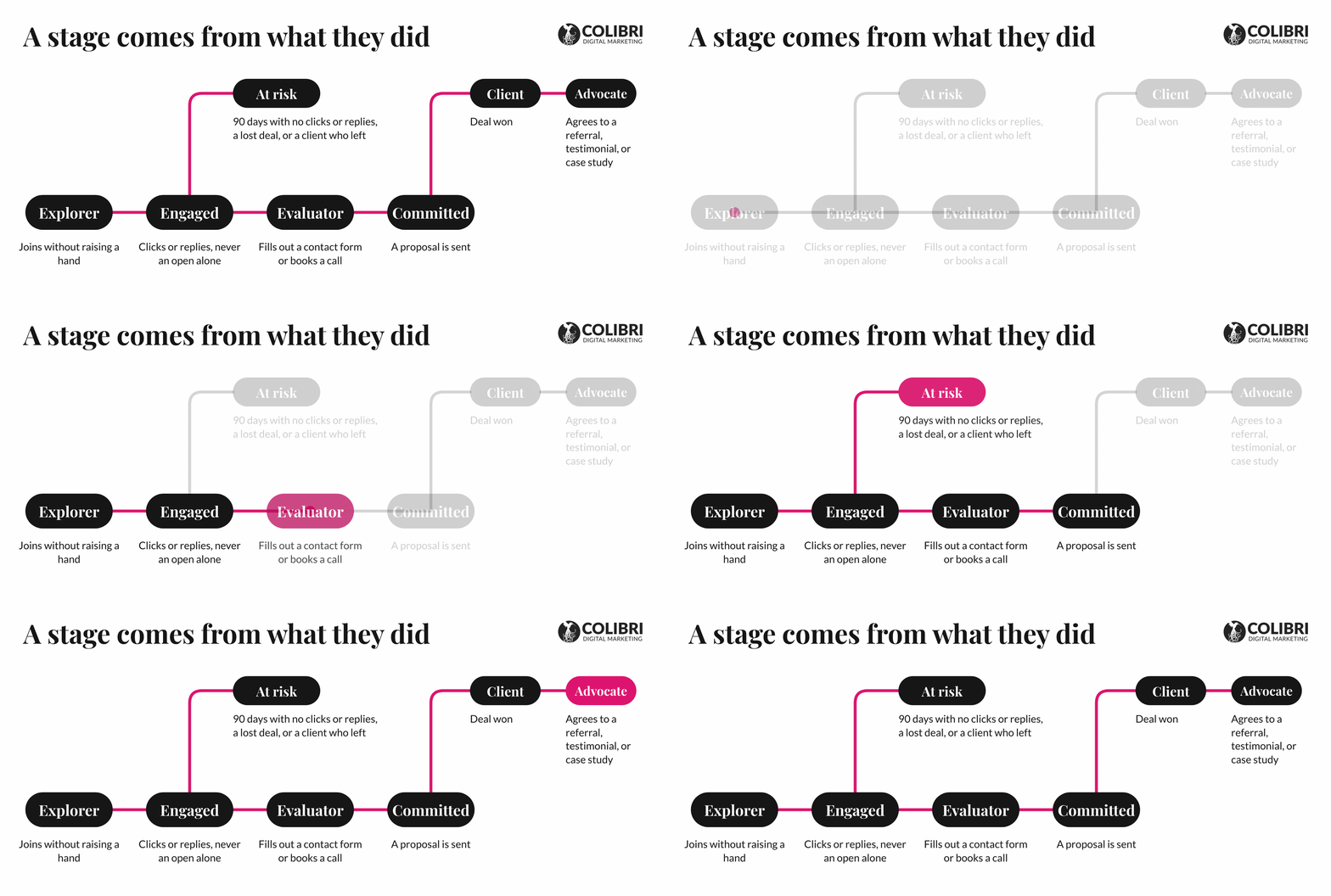
The main track has four stages: explorer, engaged, evaluator, and committed. Three more sit beside it. A contact who closes a deal becomes a client. A client who refers you, gives a testimonial, or agrees to a case study becomes an advocate, and that's a call a person makes, not an automation. And anyone who goes quiet for 90 days, loses a deal, or leaves moves to at risk.
Not every form means the same thing. Someone who signs up for your newsletter wants to read your content, and someone who fills out a contact form or books a call wants to talk to you. So the form they choose should decide their stage, and someone who goes straight to a contact form can skip the light nurture entirely.
Build the stop rules before the first sequence. Marketing pauses the moment a deal exists. Do-not-email never clears on its own, whether it's an unsubscribe, a complaint, a bounced address, or a legal request. And VIP contacts skip mass emails but still get personal mail (a workflow is a poor way to say thank you). Transactional messages, like booking confirmations and receipts, bypass all three.
When someone asks to talk, a person should answer, not an automation. Until then, email keeps you relevant and provides proof; the call is where you find out what they need. In a small firm where the founder usually follows up, automation ensures no lead goes six months without hearing from you.
| Stage | What gets them there | What they get |
| Explorer | Joins without raising a hand: newsletter signup, import, event contact | A welcome message only |
| Engaged | Clicks or replies, never an open alone | Light, useful nurture |
| Evaluator | Fills out a contact form or books a call | The asset they asked for, then the sequence written for them |
| Committed | A proposal is sent | The nurture ends; only personal, one-to-one mail |
| Client | Deal won | Onboarding |
| Advocate | Agrees to a referral, testimonial, or case study | A thank-you from a person, not a campaign |
| At risk | 90 days with no clicks or replies, a lost deal, or a client who left | One attempt to win them back, then no more marketing emails |
How Do You Integrate a CRM with Email Marketing, Step by Step?
Here are seven steps:
- Write the field list first. Every field, one owner.
- Pick the system of record and how both tools recognize the same person. Email address first, then CRM ID.
- Define four to six stages. Build one stage at a time, with a clear condition for entering each.
- Make every form write to the CRM first. Capture where the contact came from at creation, and carry it to the closed deal.
- Build the stop rules, then the nurture. We don't run a sequence we can't see land in the CRM, so build that report before the first send.
- Test every branch. Try a duplicate email, a changed email, a reversed stage, and an unsubscribe.
- Set up an alert for connection failures, name one person who owns the field list, and review it every quarter.
With one person and one list, steps 1 to 5 are an afternoon of work. If you send one newsletter and no automated sequences, you need only steps 1, 2, and 6. The rest earns its place the day a sequence can reach someone in a live conversation. For the tracking side, see our Google Analytics guide.
What Changes If You Are a Wealth Manager or Financial Advisor?
In wealth management and other sensitive industries, compliance picks the stack before features do, so read this before the pairings table below. It is general information, not legal advice.
- Registered investment advisers: a newsletter sent to more than one person that offers your advisory services is an advertisement under the SEC's Marketing Rule (3).
- Broker-dealers: FINRA treats written communication to 25 or fewer retail investors in any 30 days as correspondence and anything wider as retail communication, so a sequence that keeps enrolling new subscribers can cross that line (4).
- Either way, confirm with your compliance officer before you build.
Which CRM and Email Pairings Work for Consulting and Wealth Firms?
Size the pairing to your firm. We run ActiveCampaign ourselves, but we like to test tools and have used almost all there are.
| Firm | Pairing | Watch for |
| Solo advisor or small consulting firm | CRM and email on one platform (ActiveCampaign, HubSpot, or similar) | A thinner CRM than a dedicated one |
| Small B2B sales team | Pipedrive with ActiveCampaign | Each tool has its own stage field; keep them apart |
| Growing consultancy, five to fifty people | HubSpot CRM with Marketing Hub | How pricing scales with contacts and seats |
| Larger firm with an admin | Salesforce with Account Engagement | Needs an administrator, and is heavy under ten people |
| Independent RIA | Wealthbox or Redtail with Constant Contact or Mailchimp | Compliance approval and archiving |
These are just some recommendations on the tools you could use. None of these fixes a missing field list or a broken connection. Honestly, you can do good enough with any other tool if it’s properly set up.
How Do You Measure Whether the Integration Works?
Measure how contacts move between stages. Opens can warn you that emails aren't reaching inboxes, but they can't tell you who is interested. Four signals tell you whether the system works:
- The share of explorers who click or reply within 30 days.
- How many engaged contacts go on to fill out a contact form or book a call.
- How many of those become clients, and how long each stage takes.
- List health: bounces, complaints, unsubscribes, and how many records have a valid stage, owner, and source.
A few habits keep the numbers honest. Count a conversion in one place only: the CRM—record where each contact came from when they first arrive, and never overwrite it. Say an email influenced a deal, not that it closed it. And put counts beside percentages, because 40% of five contacts is an anecdote. Then add a "how did you hear about us" field and compare it with the system's answer.
Write the Field List This Week
The connector is the easy part once the field list exists. Build the one-page version this week: every field, one owner. In a live conversation, the prospect stops getting the cold sequence, and the data can help you say which month actually worked.
If you want a second read on your map, schedule a complimentary call with our team.

